-
Découvrez Siri AI. Une assistance IA encore plus performante avec une intelligence avancée pour mieux vous aider au quotidien1.


-
Écrivez ou parlez à Siri AI de façon naturelle pour trouver ce que vous cherchez et en faire plus.
Siri AI sera disponible en anglais dans un premier temps. Non disponible au départ dans l’UE sur iOS, iPadOS et watchOS.


-
Apple Intelligence nouvelle génération enrichit les apps que vous utilisez le plus, comme Photos, Messages et Safari1.


-
Sur Mac, l’Intelligence visuelle vous permet d’en savoir plus et d’interagir avec presque tout ce qui s’affiche à l’écran2.


-
Un design sublimé avec Liquid Glass optimisé, pour une lisibilité exceptionnelle et une expérience plus homogène d’une app à l’autre.

-
Avec une multitude d’évolutions à tous les niveaux, votre expérience sur Mac devient encore plus réactive et plus agréable.

-
Demandez à Siri AI.
Avec la puissance d’Apple Intelligence, Siri AI vous offre une assistance IA conversationnelle aux capacités totalement inédites sur Mac. Posez des questions ouvertes, cherchez des idées pour vos projets pros ou créatifs, et profitez d’échanges fluides et naturels. Et lorsque vous faites une recherche dans Spotlight, vous pouvez choisir « Demander à Siri » comme meilleur résultat.

-
Siri comprend votre contexte personnel.
Il suffit de demander, et Siri AI trouve les réponses que vous cherchez. Retrouvez une photo datant de plusieurs années, un e-mail perdu dans votre boîte de réception ou même le contenu d’une note sauvegardée sur votre Mac.

-
Effectuez des actions dans plus d’apps.
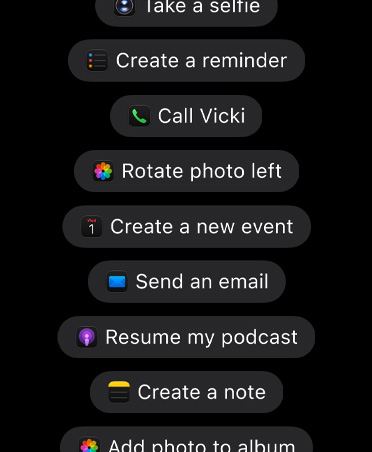
Siri AI peut agir dans des apps comme Messages, Musique, Rappels et autres, selon ce que vous êtes en train de faire. Corrigez rapidement un message tout juste envoyé, ou ajoutez à votre playlist de sport une chanson de la série que vous regardez.
-
Tout un monde de connaissances à votre portée.
Posez des questions sur presque tous les sujets, faites des recherches pour un projet ou préparez un entretien. Siri AI peut consulter des informations en ligne pour vous fournir des réponses détaillées et actualisées.

-
Découvrez l’app Siri.
Une app dédiée regroupe toutes vos conversations au même endroit. Retrouvez une question posée précédemment et reprenez là où vous en étiez, sans jamais perdre le fil. Épinglez des conversations pour y accéder facilement ou en commencer de nouvelles.

-
L’Intelligence visuelle avec Siri sur Mac.
Interrogez Siri AI sur presque tout ce qui s’affiche. Une capture d’écran, par exemple d’un PDF ou d’une image, suffit pour obtenir des réponses ou effectuer des recherches ou des actions2.

-
Utilisez Siri pour écrire presque partout.
Siri AI peut désormais générer un brouillon en partant de rien ou commenter vos écrits. Décrivez simplement ce qu’il vous faut avec vos propres mots. Et dans Messages et Mail, Siri AI peut adapter le style, la ponctuation et le ton pour écrire comme vous le feriez vous-même.

-
Personnalisez la voix de Siri.
Choisissez une voix, puis ajustez son intonation et son débit jusqu’à trouver ce qui vous convient3.

-
Du génie dans Safari.
Sur Mac, vos onglets peuvent désormais être automatiquement regroupés par thèmes, pour retrouver facilement les pages associées. Et avec Me prévenir, Safari surveille vos pages web et vous alerte dès qu’un prix baisse ou qu’un produit est de nouveau disponible.

-
Vos mots de passe renforcés en un clic.
L’app Mots de passe vous alerte lorsque certains de vos mots de passe sont faibles ou compromis, et peut les mettre à jour à votre place.
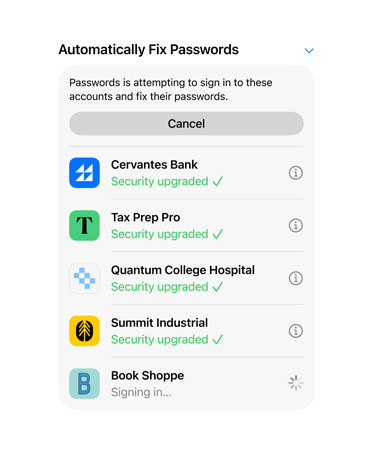
Disponible à l’avenir sous forme de mise à jour logicielle.
-
La retouche photo intelligente nouvelle génération.
Recadrez votre cliché après l’avoir pris avec le Recadrage spatial. Repoussez les limites de vos images avec l’outil Étendre. Et supprimez des éléments encore plus grands avec l’outil Correction amélioré.

Des limites d’utilisation peuvent s’appliquer.
-
Exprimez votre créativité avec Image Playground.
Créez des images uniques de haute qualité pour tous vos projets dans pratiquement tous les styles, y compris photoréaliste. Modifiez et transformez vos images à l’aide d’une simple description, et profitez de possibilités infinies.

Des limites d’utilisation peuvent s’appliquer.
-
Décrivez un raccourci.
Automatisez vos tâches quotidiennes à l’aide d’une simple description. Expliquez ce dont vous avez besoin, et Raccourcis enchaîne les actions nécessaires dans vos apps.

Des limites d’utilisation peuvent s’appliquer.
-
Approuvez les nouveaux sites web.
Avec la nouvelle fonctionnalité Demande de consultation5, les enfants doivent demander l’autorisation pour accéder à de nouveaux sites web. Les parents peuvent examiner la demande dans Messages avant de l’approuver6.

-
Aidez-les à communiquer en toute sécurité.
La fonctionnalité Sécurité des communications aide à protéger les enfants contre l’affichage ou le partage d’images de nudité dans Messages, FaceTime et plus encore. Elle intervient désormais aussi avant que les enfants voient des contenus violents ou choquants dans les images et vidéos partagées.

-
Limites de temps et Programmes.
Les parents peuvent définir des limites de temps pour des catégories comme Divertissement, Jeux et Réseaux sociaux. Nous proposons des conseils basés sur l’âge de l’enfant, élaborés avec des spécialistes en médecine clinique et en développement de l’enfant, que les parents peuvent ajuster comme bon leur semble. Et Programmes permet de choisir quelles apps sont accessibles à différents moments ou jours de la semaine.

-
Réglages simples et intuitifs.
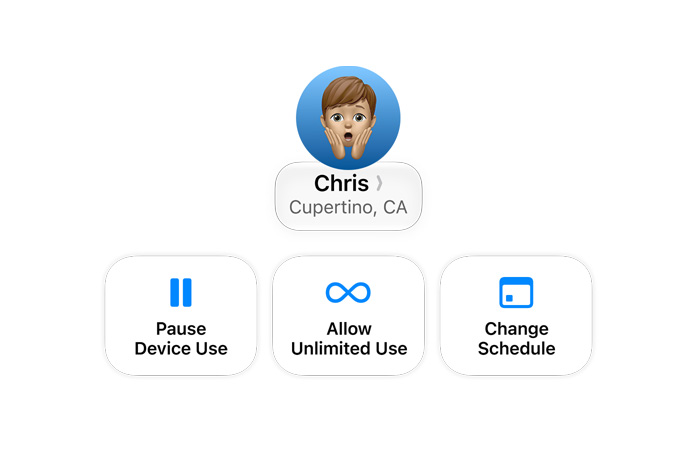
Un design repensé simplifie l’utilisation du contrôle parental dans Réglages Système. Les parents peuvent voir comment leurs enfants ont utilisé leur Mac d’un simple coup d’œil et ajuster l’accès en temps réel en un clic.
-
Design optimisé.
Les mises à jour apportées à Liquid Glass assurent une lisibilité exceptionnelle avec une réfraction plus uniforme et un contraste amélioré. Ce design raffiné se retrouve dans les barres d’outils, les barres latérales bord à bord, les formes de fenêtres et les icônes de menu. Et grâce à un nouveau curseur, ajustez facilement son apparence, d’une transparence parfaite jusqu’à un effet entièrement teinté.

-
Des performances plus rapides.
Grâce à des transferts AirDrop plus rapides, une navigation réseau améliorée et un chargement de la page de démarrage de Safari optimisé, votre Mac se montre plus réactif que jamais.
-
Une recherche plus précise dans Mail.
Un nouveau système de classement place les résultats les plus pertinents en tête de liste pour vous aider à trouver rapidement l’e-mail que vous cherchez, même s’il est enfoui au fond de votre boîte de réception.

-
Et tellement plus.
Avec des évolutions au cœur du système et des avancées dans les apps que vous utilisez au quotidien, macOS n’a jamais été aussi agréable à utiliser.

Fonctionnalités de macOS 27 Golden Gate Et ce n’est pas tout.

Accessibilité.
VoiceOver s’enrichit de nouvelles capacités pour comprendre les contenus à l’écran, avec des descriptions d’images plus détaillées. Une nouvelle fonctionnalité génère automatiquement des sous-titres synchronisés pour n’importe quelle vidéo, et peut même traduire des sous-titres existants dans d’autres langues.

Décrivez un évènement pour l’ajouter à votre Calendrier.
Ajoutez et modifiez des évènements dans votre calendrier à l’aide d’une simple description. Une réunion qui devient un café ? Modifiez la description et Calendrier ajuste les détails.

Prise en charge des écrans ultra-larges.
Bénéficiez désormais de résolutions plus élevées sur les écrans ultra-larges, comme la 5K à 120 Hz. La disposition de vos écrans reste exactement telle que vous l’avez laissée, pour une expérience fluide à chaque branchement.

Albums partagés iCloud améliorés.
Sur iCloud.com, vos proches utilisant Android ou Windows peuvent plus facilement rejoindre vos albums et y ajouter leurs propres photos. Les albums partagés permettent aussi d’envoyer des photos en haute résolution et offrent de nouvelles façons de filtrer les images, d’y réagir et d’inviter d’autres personnes.

Faites-en plus avec les Suggestions.
Messages7 et Mail vous proposent des suggestions pour effectuer rapidement des actions en fonction du contexte de votre conversation, comme ajouter un évènement à votre calendrier ou retrouver une photo, en un clic. Bientôt disponible en anglais.

Toutes les infos qu’il vous faut pendant vos appels.
Lorsque vous appelez une entreprise, Contexte de l’appel peut afficher de manière proactive des informations utiles issues de vos apps, comme un code de confirmation reçu dans Mail quand vous appelez une compagnie aérienne. Bientôt disponible en anglais.

Flyover amélioré dans Plans.
Flyover associe désormais images aériennes et modèles d’Intelligence visuelle pour tout restituer avec un niveau de détail stupéfiant, des éléments architecturaux jusqu’à la forme de chaque arbre.

Balayez vers le bas pour actualiser.
Dans des apps comme Safari, Mail, Podcasts et Calendrier, balayez vers le bas pour afficher le contenu à jour.

Une expérience optimisée pour les podcasts vidéo sur Mac.
Regardez ou écoutez vos podcasts vidéo selon vos envies, aussi naturellement que vos podcasts audio.