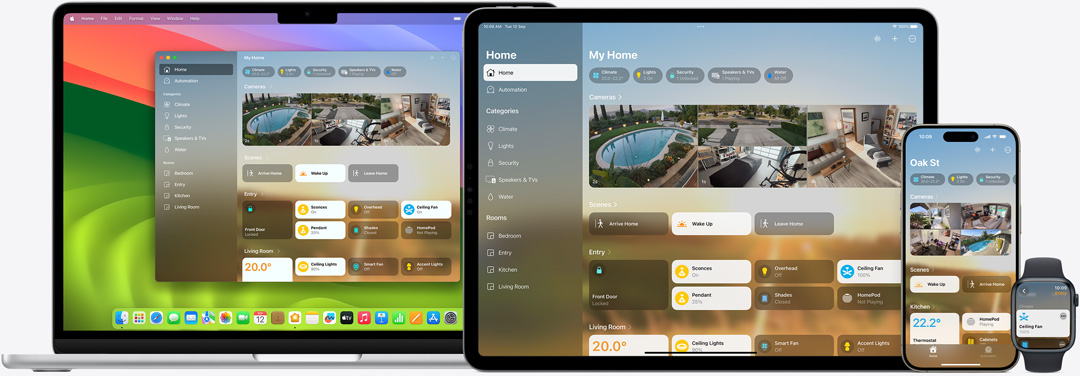
The Home app makes it easier to control all your smart home accessories1 — on all your Apple devices. It’s secure and protects your personal data. And with HomePod, HomePod mini or Apple TV set up as the ultimate home hub, the Home app unlocks the full potential of your smart home.
A truly welcoming experience.
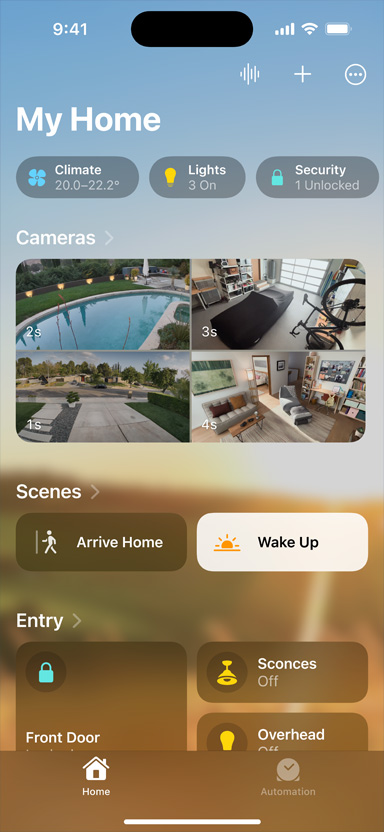
Categories like Lights, Security and Climate are at the top of the Home tab, giving you instant access to accessories and their status.
Colour-coordinated icons help you find the accessories you’re looking for.
View up to four cameras at once to quickly make sure each room is just as you left it.
Rooms and Favourite Accessories are grouped in the Home tab, so you can easily view and control your smart devices.
Get an at-a-glance look with the Lock Screen widget on iPhone, or quickly access the Home app via Control Centre.
Guest access lets you assign permissions to door locks, garage doors and alarm systems — so trusted people in your life can come and go for as long as you allow.2
HomePod, HomePod mini and Apple TV. The keys to even more control.
The Home app can do even more with the help of your HomePod, HomePod mini or Apple TV. Each one can be set up as a smart home hub,3 giving you access to your home while you’re away and letting you automate all of your home’s smart accessories. They are also essential building blocks for Matter4 — the smart home industry standard that is compatible with more accessories, and even connects them across platforms.
Clean the floors
Start your robot vacuum as you leave for work or ask Siri to clean a specific room5.
Lock doors at bedtime
Automate the locking of all the doors in
your house.
View live cameras
Get notified when someone is at your door while you’re working at your desk.
Turn lights on at sunset
Set an automation to activate lights at a specific time.
Close your blinds and curtains
Set your blinds to close automatically when leaving your house.
Turn on heat before coming home
Remotely warm up your
house before returning
from vacation.
Start your coffee maker
Using a smart plug, ask Siri
for a fresh pot of coffee while you’re out on a morning run.
Ask Siri to shut the garage door
Forget to shut your garage? Close it remotely
with Siri.
Turn lights on downstairs
Use a motion sensor to
turn on lights as you head
to the kitchen.
Start a fan
Automatically turn on a fan when the temperature rises.
Your data is private property.
Privacy at home is more important than ever. That’s why your Home app data is stored in a way that Apple can’t read it. Your accessories are controlled by your Apple devices instead of the cloud, and communication is encrypted end to end. So only you and the people you choose can access your data.