 Save up to $1200 after trade-in.
 Save up to $1000 with an eligible trade-in in any condition.
 Save up to $840 with an eligible trade-in in any condition.
Pre‑order iPhone Duo.
Available starting 10.23.Frequently Asked Questions
-
An eSIM is a digital SIM that eliminates the need for a physical SIM card. With eSIM, you can quickly and easily transfer an existing cellular plan or get a new cellular plan, all digitally. You can even store multiple eSIMs on the same device and use two phone numbers at the same time. And it’s more secure — someone can’t remove the physical SIM card if your iPhone is lost or stolen. In just a few simple steps, you are ready to make calls, send messages, and browse the web. Learn more about eSIM (Opens in a new window) .
iPhone Duo is activated with an eSIM and does not support a physical SIM. Use of an eSIM requires a carrier that supports eSIM and a wireless service plan. See your carrier for details. Learn more about eSIM and carriers (Opens in a new window) . -
An iPhone Duo purchased in the U.S. or Puerto Rico doesn’t have a physical SIM tray and activates only using eSIM. You can activate your iPhone outside of the country if your carrier supports eSIM. Learn more about eSIM and carriers (Opens in a new window).
While traveling internationally, your carrier may offer convenient and affordable international roaming options. Additionally, if your iPhone is unlocked, you can use a travel eSIM at your destination. Learn more about using eSIM while traveling (Opens in a new window).
-
In most cases, yes. An iPhone purchased from Apple is unlocked. Once your new iPhone is activated, it remains unlocked, which means you can use it with any carrier that provides service for iPhone. However, if you choose to finance an iPhone through the AT&T Installment Plan, T-Mobile Equipment Installment Plan, or Verizon Device Payment Program, your iPhone will be locked to the carrier until paid in full.
-
Carrier-connected iPhone 16, iPhone 17e, iPhone 17, iPhone Air, iPhone 18 Pro, and iPhone Duo models will arrive ready to activate with eSIM and can connect to your cellular voice and data service without a physical SIM card.
If you completed the steps to authorize activation with AT&T, T-Mobile, or Verizon when you purchased your new iPhone online, it will arrive ready to use. Just turn it on and follow the onscreen instructions to set it up and activate with the carrier. To activate with eSIM, you will need Wi-Fi for setup.
If you choose “Connect to a carrier later” when you buy your iPhone, you can activate your service when you receive your device. If you’re asked to transfer your SIM, follow the onscreen instructions to transfer service from your previous iPhone. Learn how to set up eSIM on iPhone (Opens in a new window) .
-
All iPhone models are world phones, so you can use them almost anywhere. Whether you are a GSM or CDMA network customer, you can roam internationally on GSM networks in over 200 countries or regions around the world. If you financed your iPhone with your wireless carrier, contact them to verify that you can roam internationally.
Availability of 5G and LTE data varies in some countries or regions and depends on carrier support for certain 5G and LTE radio frequencies. Contact your wireless carrier for more information regarding international roaming policies and rates.
Information on iPhone support for 5G and LTE (Opens in a new window)
-
Yes. If you change your mind and no longer wish to keep your iPhone, you have the option to return it to us. The returned iPhone must be in good condition and in the original packaging, which contains all accessories, manuals, and instructions. Returns are subject to Apple’s Sales and Refunds Policy.
-
In most cases, an iPhone purchased from apple.com can be activated later. However, certain special deals or discounts may require preparation with the carrier at the time of purchase so that the phone arrives ready to use.
-
When you buy directly from Apple, you’ll get access to Personal Setup — free online, one‑on‑one sessions with a Specialist who can help you set up your new iPhone and start your data transfer. A Specialist can also help you customize your settings, discover navigation tips, and dive deeper into Apple apps and tools. Best of all, you can join whenever works for you, from wherever you are. Learn more about Personal Setup(Opens in a new window).
-
The iPhone models for AT&T, T-Mobile, and Verizon are the same. However, if you choose to finance an iPhone through the AT&T Installment Plan, T-Mobile Equipment Installment Plan, or Verizon Device Payment Program, your iPhone will be locked to the carrier until paid in full.
-
Yes. You can switch carriers when you purchase an iPhone directly from Apple and choose carrier financing as your payment option. You’ll also be able to keep your existing number and data. And your new iPhone will arrive ready to use, without you having to contact your former carrier.
-
Apple Upgrade is a leasing program offered in partnership with Klarna. Lease an iPhone or Apple Watch for 12 or 24 months, or an iPad or Mac for 24 or 36 months. Then easily upgrade to something new at the end of your term. You can even upgrade early by paying the full amount of your remaining lease payments plus applicable taxes. In either case, you must return your original device in good working condition.
Footnote ◊ Enroll in Apple Upgrade by selecting which Apple product you want, choosing Apple Upgrade as your payment option, selecting the term that works best for you, and filling out your application during checkout.
-
Connectivity discounts are reflected in the advertised price of select iPhone models, and are available to customers who connect with select carriers at the time of purchase. The discount is not available for customers who choose to connect to a carrier later, or who have a prepaid carrier plan.
-
AT&T, T-Mobile, and Verizon are the national wireless carriers for iPhone in the United States, and they all offer 5G service. iPhone 16, iPhone 17e, iPhone 17, iPhone Air, iPhone 18 Pro, and iPhone Duo models are 5G capable. The Apple Store and apple.com (Opens in a new window) sell these models for use on these networks.
View the AT&T 5G coverage map (Opens in a new window)
-
AppleCare One coverage extends to products that were purchased recently or are currently covered by AppleCare+. Other eligible devices are those currently associated with your Apple Account, Apple audio or headphones less than 1 year old, and other Apple devices that are less than 4 years old and in good condition. Learn more about AppleCare (Opens in a new window).
Set up your device with one-on-one sessions with a Specialist.

When you buy directly from Apple, you can get help transferring your data and making the most of your new device with our free online Personal Setup sessions.
Your new iPhone comes with so much more.
Get 3 months of select services free when you purchase an Apple device.

Which iPhone is right for you?


7.6”
7.6-inch Super Retina XDR folding display with nano‑texture
5.4-inch Super Retina XDR outer display
ProMotion technology
Always-On display
Dynamic Island

Reimagined iOS experiences for ultimate versatility
Titanium frame and hinge cover
— No Action button
Camera Control for faster access to photo and video tools
Up to 44 hours video playback when using the outer display
Up to 31 hours video playback when using the inner display
A20 Pro chip
6-core CPU
7-core GPU with Neural Accelerators
Dual 16-core Neural Engine
Hardware-accelerated ray tracing
48MP Dual Fusion camera system
48MP Fusion Main | 48MP Fusion Ultra Wide
— No Pro controls
Super-high‑resolution photos
(24MP and 48MP)
Smart Take
Duo Preview
Photographic Styles 3
Dolby Vision up to 4K at 120 fps
Smart focus tracking
Cinematic mode effects from video (Fusion Main)
Improved low-light video
— No Apple Reference Image (Fusion Main)
Next-generation portraits with Focus and Depth Control
Macro photography
12MP Center Stage front camera
Tap to zoom and rotate
Center Stage for photos
Ultra-stabilized video
Dual Capture
Center Stage for video calls
Under-display FaceTime camera

Optical zoom options .5x, 1x, 2x
— No ƒ/1.48, ƒ/1.8, ƒ/2.8, ƒ/4.0 variable aperture options (Fusion Main)

Apple Intelligence
Siri AI
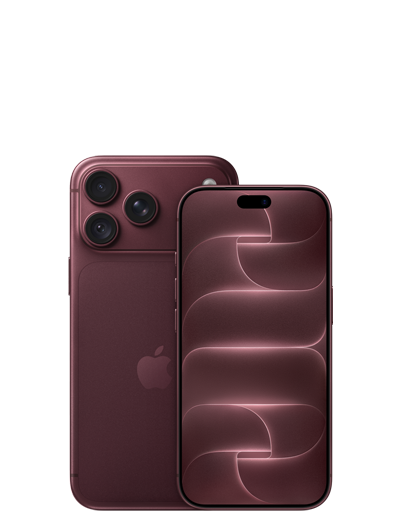

6.9″ or 6.3″
Super Retina XDR display
— No 5.4-inch Super Retina XDR outer display
ProMotion technology
Always-On display
Dynamic Island
— No Reimagined iOS experiences for ultimate versatility.
Aluminum unibody
Action button
Camera Control for faster access to photo and video tools
Up to 45 hours video playback
— No Up to 31 hours video playback when using the inner display
A20 Pro chip
6-core CPU
7-core GPU with Neural Accelerators
Dual 16-core Neural Engine
Hardware-accelerated ray tracing
48MP Pro Fusion camera system
48MP Fusion Main with variable aperture | 48MP Fusion Ultra Wide | 48MP Fusion Telephoto
Pro controls
Super-high‑resolution photos
(24MP and 48MP)
— No Smart Take
— No Duo Preview
Photographic Styles 3
Dolby Vision up to 4K at 120 fps
Smart focus tracking
Cinematic mode effects from video (Fusion Main)
Improved low-light video
Apple Reference Image (Fusion Main)
Next-generation portraits with Focus and Depth Control
Macro photography
18MP Center Stage front camera
Tap to zoom and rotate
Center Stage for photos
Ultra-stabilized video
Dual Capture
Center Stage for video calls
— No Under-display FaceTime camera

Optical zoom options .5x, 1x, 2x, 4x, 8x
ƒ/1.48, ƒ/1.8, ƒ/2.8, ƒ/4.0 variable aperture options (Fusion Main)
Apple Intelligence
Siri AI


6.5”
Super Retina XDR display
— No 5.4-inch Super Retina XDR outer display
ProMotion technology
Always-On display
Dynamic Island
— No Reimagined iOS experiences for ultimate versatility.
Titanium frame
Action button
Camera Control for faster access to photo and video tools
Up to 27 hours video playback
— No Up to 31 hours video playback when using the inner display
A19 Pro chip
6-core CPU
5-core GPU with Neural Accelerators
16-core Neural Engine
Hardware-accelerated ray tracing
48MP Fusion camera system
48MP Fusion Main
— No Pro controls
Super-high‑resolution photos
(24MP and 48MP)
— No Smart Take
— No Duo Preview
Photographic Styles 2
Dolby Vision up to 4K at 60 fps
— No Smart focus tracking
— No Cinematic mode effects from video (Fusion Main)
— No Improved low-light video
— No Apple Reference Image (Fusion Main)
Next-generation portraits with Focus and Depth Control
— No Macro photography
18MP Center Stage front camera
Tap to zoom and rotate
Center Stage for photos
Ultra-stabilized video
Dual Capture
Center Stage for video calls
— No Under-display FaceTime camera

Optical zoom options 1x, 2x
— No ƒ/1.48, ƒ/1.8, ƒ/2.8, ƒ/4.0 variable aperture options (Fusion Main)
Apple Intelligence
Siri AI


6.3”
Super Retina XDR display
— No 5.4-inch Super Retina XDR outer display
ProMotion technology
Always-On display
Dynamic Island
— No Reimagined iOS experiences for ultimate versatility.
Aluminum frame
Action button
Camera Control for faster access to photo and video tools
Up to 30 hours video playback
— No Up to 31 hours video playback when using the inner display
A19 chip
6-core CPU
5-core GPU with Neural Accelerators
16-core Neural Engine
Hardware-accelerated ray tracing
48MP Dual Fusion camera system
48MP Fusion Main | 48MP Fusion Ultra Wide
— No Pro controls
Super-high‑resolution photos
(24MP and 48MP)
— No Smart Take
— No Duo Preview
Photographic Styles 2
Dolby Vision up to 4K at 60 fps
— No Smart focus tracking
— No Cinematic mode effects from video (Fusion Main)
— No Improved low-light video
— No Apple Reference Image (Fusion Main)
Next-generation portraits with Focus and Depth Control
Macro photography
18MP Center Stage front camera
Tap to zoom and rotate
Center Stage for photos
Ultra-stabilized video
Dual Capture
Center Stage for video calls
— No Under-display FaceTime camera
Optical zoom options .5x, 1x, 2x
— No ƒ/1.48, ƒ/1.8, ƒ/2.8, ƒ/4.0 variable aperture options (Fusion Main)
Apple Intelligence
Siri AI


6.1″
Super Retina XDR display
— No 5.4-inch Super Retina XDR outer display
— No ProMotion technology
— No Always-On display
— No Dynamic Island
— No Reimagined iOS experiences for ultimate versatility.
Aluminum frame
Action button
— No Camera Control for faster access to photo and video tools
Up to 26 hours video playback
— No Up to 31 hours video playback when using the inner display
A19 chip
6-core CPU
4-core GPU with Neural Accelerators
16-core Neural Engine
Hardware-accelerated ray tracing
48MP Fusion camera system
48MP Fusion Main
— No Pro controls
Super-high‑resolution photos
(24MP and 48MP)
— No Smart Take
— No Duo Preview
Photographic Styles
Dolby Vision up to 4K at 60 fps
— No Smart focus tracking
— No Cinematic mode effects from video (Fusion Main)
— No Improved low-light video
— No Apple Reference Image (Fusion Main)
Next-generation portraits with Focus and Depth Control
— No Macro photography
12MP TrueDepth camera
Tap to zoom
— No Center Stage for photos
— No Ultra-stabilized video
— No Dual Capture
— No Center Stage for video calls
— No Under-display FaceTime camera

Optical zoom options 1x, 2x
— No ƒ/1.48, ƒ/1.8, ƒ/2.8, ƒ/4.0 variable aperture options (Fusion Main)
Apple Intelligence
Siri AI